Prefer to watch? Your dashboard 0:43 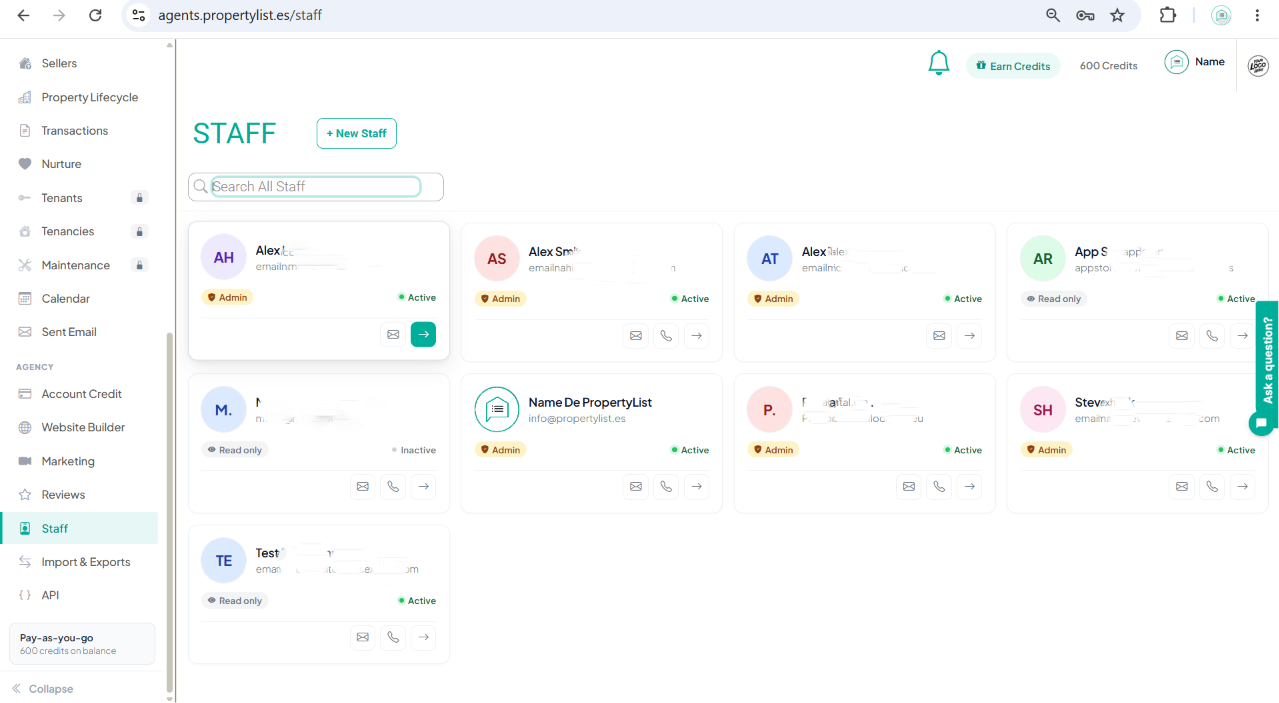
The sidebar, here with Staff open. The plan and credit balance sit at the bottom. ![]()
How do I navigate the MLS dashboard and interface
Where everything lives in the MLS: the left sidebar item by item, the top bar, and your plan and credit balance.
The left sidebar is the same on every screen and holds everything you can open. This page maps it, so you can find a feature without hunting for it.
How the screen is laid out
- Left sidebar: every module, in the order listed below. Collapse at the very bottom narrows it to icons.
- Top bar: your notifications bell, an Earn Credits button, your current credit balance, and your account menu on the far right.
- Plan summary: just above Collapse, showing your plan and the credits on your balance.
Main modules
- Sellers: not live yet. It is coming soon.
- Property pipeline: your stock board, showing where each property is in its life. See Property pipeline.
- Transactions and Nurture: these open and work today. Guides for them are being written.
- Tenants, Tenancies and Maintenance: shown with a padlock. These are paid add-ons and unlock once they are added to your account.
- Calendar: see Managing your schedule and tasks.
- Sent Email: mail sent from the platform. See Connect your email.
The AGENCY group
Below the main modules, these settings apply to your whole agency rather than to one property or contact.
- Account Credit: your balance and what it is spent on. See How billing works.
- Website Builder: see Website Builder.
- Marketing: see Marketing.
- Reviews: a guide is being written.
- Staff: add colleagues and set what each can do. See Adding staff members and permissions.
- Import & Exports: feeds in and out. See Import properties and Export listings XML.
- API: a guide is being written.