Rentals Module
Your rental book, out of the spreadsheet.
Long-term lettings inside the CRM you already use for sales. One record per tenancy that chases its own renewals, and repairs the tenant reports, with the landlord approving anything above a threshold you set.
Get started free What it costs
Free, with no card. Already with PropertyList? Open the Rentals tab in your account.
Start with the tenancies you already manage.
Three ways in, and none of them is typing it all again.
Import CSV.
A button at the top of the Tenancies screen, not a buried setting. Bring a whole rental book over in one go.
From the deal.
A rental deal that reaches Contract Signed writes its own tenancy: property, tenant, landlord, dates, rent and deposit. You fill the gaps.
By hand.
New Tenancy, for the agreements that live nowhere else yet.
Nothing changes on the sales side. Same login, same contacts, same listings, same sales pipeline. The module adds a Rentals section with Tenancies and Maintenance, and the Tenants board.
From enquiry to signed lease.
The Tenants pipeline, exactly as it ships. Thirteen stages, and two of them do work for you.
- 1Rental Lead
- 2Qualified, criteria defined
- 3Matching properties
- 4Viewings booked
- 5Viewings in progress
- 6Negotiating
- 7Reservation paid
- 8Contract review
- 9Contract signed
- 10Deposit paid
- 11Awaiting move-in
- 12Active tenancy
- 13Renewal pending
9. At Contract signed the tenancy writes itself from the deal, and your listing is set to reserved. If the property belongs to another agency, they get an email asking them to update it, because PropertyList does not change another agency's listing. This works across agencies because both are on the same network.
12. At Active tenancy you are asked for the dates, the tenant and landlord details and marketing consent, and both go into Nurture.
What is inside. Open any line.
Nine things the module does, most of them without being asked. All of it is long-term lettings.
Tenants pipelineThirteen stages, enquiry to active tenancy.
Thirteen stages from first enquiry to active tenancy, on its own board, beside the sales pipeline you already run.
Tenancies that keep themselves currentDraft, Active, Expiring, without you moving it.
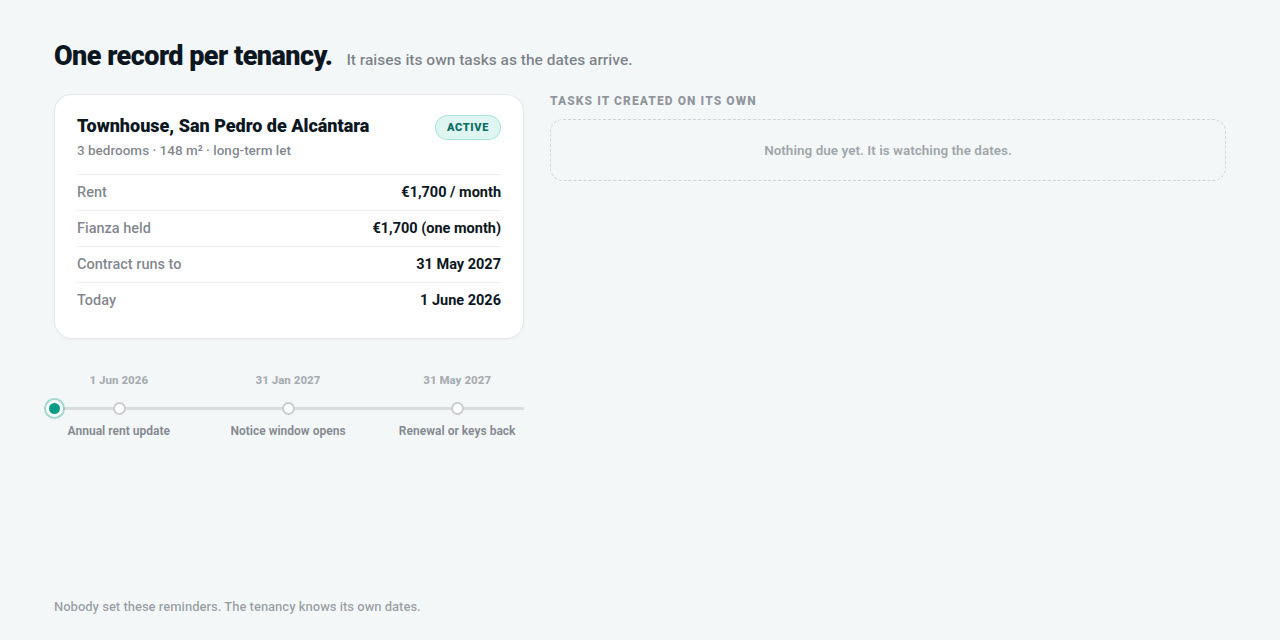
One record per lease. Draft, then Active when the start date passes, then Expiring when the renewal window opens. You do not move it.
Your existing book, importedCSV for the whole book, by hand for one-offs.
CSV import for a whole rental book, a manual option for one-offs, and new deals create their own tenancy.
Renewal alertsTold before the lease ends, at 60, 90 or 120 days.
The tenancy moves to Renewal Pending and tells you before the lease ends, on a window you set at 60, 90 or 120 days.
Annual rent reviewThe permitted new rent, and the notice drafted.
It knows the anniversary and the current rent, works out the permitted new rent against the official index, and drafts the notice.
Deposit tracking and audit logEvery change timestamped against the agent responsible.
Unpaid, Held, then Returned or partly withheld, every change timestamped against the agent responsible, with the lodging window watched where your region still requires it.
Repairs the tenant startsA magic link, photos, no login.
Tenants raise their own tickets by magic link with photos, no login, already attached to their tenancy. You triage rather than transcribe.
Landlord approval thresholdsSmall jobs go ahead; big ones need one click.
Small jobs go ahead. Anything above the threshold goes to the landlord with photos and quote, and they approve or decline in one click.
Rentals dashboardRent roll, your income, deposits, actions needed.
Live tenancies, expiring in 60 days, monthly rent roll, your monthly income as management commission at the rate set per tenancy, deposits and actions needed, plus your average days to resolve.
One record per lease, and its status follows the dates rather than waiting for someone to remember. A renewal chains to a new linked tenancy, so the history stays intact.
A repair, from the tenant's phone to closed.
The part that eats a letting agent's week. Three parties, one thread.
Tenant
- Opens the magic link sent at move-in and repeated in their emails. No login, no app.
- Describes the problem and adds photos. A plumber quoting from two photos often saves a visit.
- Confirms the repair at the end, which is what closes the ticket.
You
- The ticket arrives already linked to the tenancy, tenant and property. You triage it.
- Record who pays: landlord, tenant, agency or split.
Landlord
- Nothing at all, if the cost is under the approval threshold you hold for them.
- Above it, an email with the issue, the photos and the quote.
- Approve or Decline in one click, and the decision is on the record if it is ever disputed.
Urgent jobs, a leak or no water or anything electrical, go straight to the Daily Action Queue with an SLA timer. Anything sitting a week without an update surfaces like a stalled deal. The annual boiler revision and gas certificate raise their own ticket on the anniversary.
Six numbers, one screen.
The rentals dashboard, so you can answer a landlord without opening a spreadsheet.
Your monthly income is your management commission, at the rate set on each tenancy, so the rent roll and what it actually pays you sit side by side. Plus your average days to resolve a repair, and views for live, expiring, ended and all.
Built for Spanish rental law.
The audit log timestamps every status and deposit change against the agent responsible, giving you defensible evidence for deposit disputes under LAU art. 36 and the deposit rules of your region.
No more reconstructing who changed what, and when, after a dispute has already started.
Two deadlines the module records but does not decide for you. To stop a contract renewing once its minimum term is over, LAU art. 10 gives the landlord four months and the tenant two. RDL 28/2026, which would have raised the landlord's notice to six months from 15 November 2026, was repealed on 12 November 2026 and never applied, so the four and two months stand. And since 24 January 2026 the Junta de Andalucía no longer takes in fianzas (Ley 5/2025, DA 6ª), so an Andalusian landlord keeps the deposit. Lodging still applies in Catalonia, Madrid and Valencia. Deposits lodged in Andalusia before that date are returned by the Junta as those contracts end, on request. The rules in full.
Rentals Module
Free
No card needed. Portal enquiries about your rentals are free as well.
- The Tenants pipeline, thirteen stages
- Enquiries on your rental listings from other agents and your own website go into the Tenants pipeline, and you can add your own leads. Portal enquiries about your rentals are free as well
- Tenancies that update themselves
- CSV import of your existing book
- Renewal alerts and the annual rent review
- Deposit tracking with an audit log
- Repairs by magic link, with landlord approval thresholds
- The rentals dashboard
What it costs.
The Rentals Module is free, with no trial period and no card to enter. Portal enquiries about your rentals are free as well.
What it does not do.
Worth knowing before you start rather than during it.
Not in the module
- It does not lodge your deposits. Where your region still requires lodging, the tenancy records it and warns you before the window closes. Filing it stays yours.
- It does not file with the police or issue registration numbers. Police guest registration (RD 933/2021) applies to lodging activities. For holiday bookings, automatic guest registration is coming. See guest registration with the police for the duty itself.
- Seasonal contracts. The module is built around long-term lettings, and the annual rent review in particular assumes a long-term rent. Talk to us before you move a temporada book across.
On the roadmap
- Automatic guest registration for holiday lets. The report to SES.HOSPEDAJES, sent automatically. Holiday bookings themselves are live: see what they do.
- Landlord statements. A periodic report per landlord covering repairs done, what they cost, the invoices, deposit status and rent roll. Every ticket already records who pays, so the data will be there when it ships.
Questions.
Can I bring the tenancies I already manage into it?
Yes. Import CSV sits at the top of the Tenancies screen and brings an existing rental book over in one go. There is a manual option for one-off agreements, and any new rental deal creates its tenancy automatically when it reaches Contract Signed, pre-filled from the deal.
What does the Rentals module include?
A Tenants pipeline of thirteen stages, tenancies that move through Draft, Active, Expiring and then Renewed, Periodic or Ended on their own, renewal alerts on a window you set, the annual rent review against the official index, deposit tracking with an audit log, maintenance tickets the tenant raises by magic link with landlord approval thresholds, and a dashboard of live tenancies, expiring contracts, rent roll, your monthly income, deposits and actions needed. It covers long-term lettings.
How much does the Rentals module cost?
It is free. There is no trial period and no card is needed. Portal enquiries about your rentals are free as well.
Does it change anything on the sales side of my agency?
No. Same login, same contacts, same listings, same sales pipeline. The module adds a Rentals section with Tenancies and Maintenance, and the Tenants pipeline board.
Do tenants and landlords need accounts?
No. Tenants report repairs through a magic link sent at move-in and repeated in their emails, with photos and no login. Landlords approve or decline a job above their threshold from an email, in one click.
Does the Rentals module keep me compliant with Spanish rental law?
It gives you the evidence, not the compliance. The audit log timestamps every status and deposit change with the agent responsible, which is what a deposit dispute under LAU art. 36 turns on. It does not lodge deposits with a regional body or issue a rental registration number: those stay your obligation. It files nothing with the police either. Police guest registration (RD 933/2021) applies to lodging activities, and automatic guest registration is coming for holiday bookings only.
Does it handle holiday lets?
Yes. Mark a listing as available for short-term rental and it takes online bookings: nightly prices and seasons, instant book or request to book, card payments into your own Stripe account, cancellation terms and calendar sync with Airbnb, Booking.com and Vrbo. Automatic guest registration with the police is still being built. Seasonal contracts sit in between: talk to us before you move a temporada book across.
Run lettings the same place you run sales.
One login, one contact database, one workflow for the whole agency. Already with PropertyList? The Rentals tab is in your account, with Tenancies and Maintenance inside it.