The vendor thinks it is worth 20% more.
Bring the register.
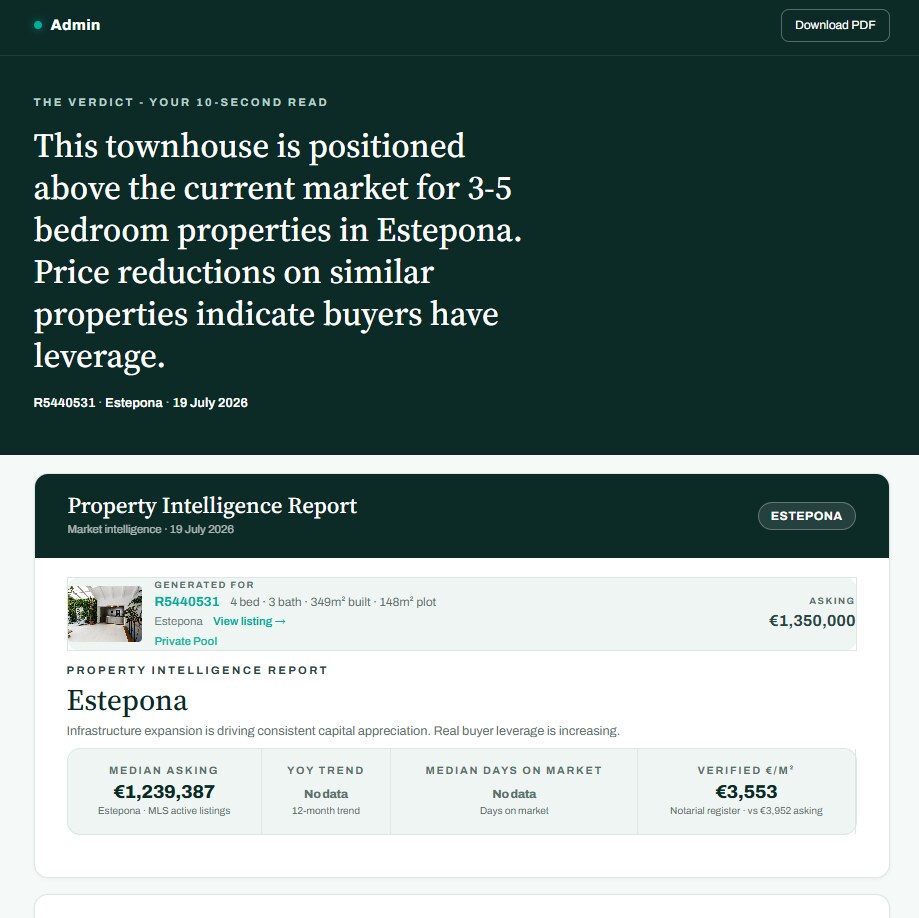
The Property Intelligence Report turns any listing into an evidence-based market price estimate in seconds - built on live MLS data and notary-verified sale prices from the official Spanish register. It also tells you what to say, handles the objections you will hear, and gives your client a clean version you control and can track.
Free MLS + CRM · first 3 reports free · cached 30 days · teammates view yours free · no account? join free
One click from any listing
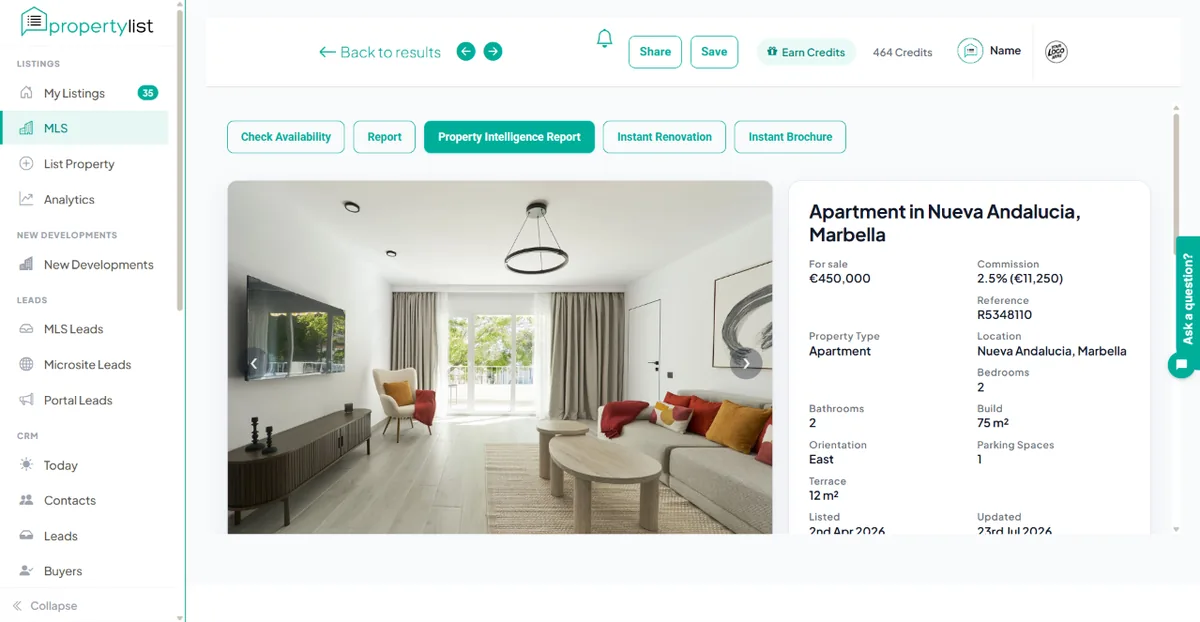
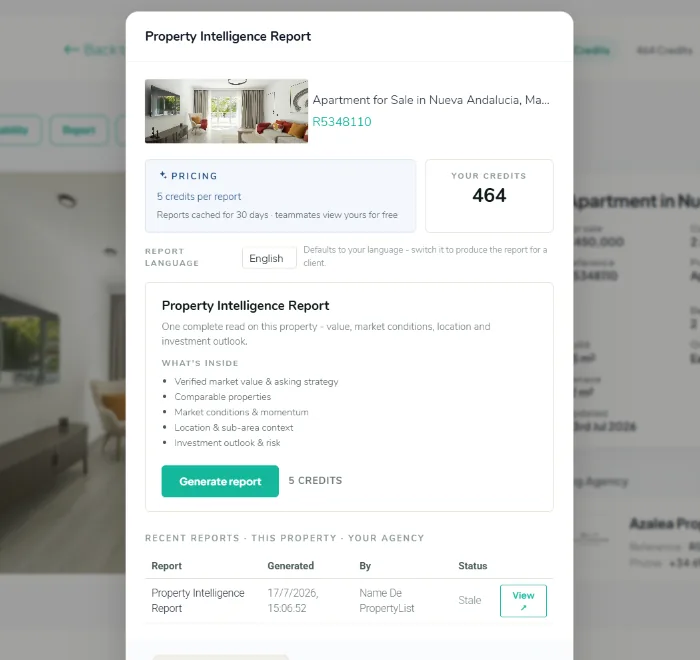
Open a property in the MLS and hit Property Intelligence Report. Pick the report language - it defaults to yours, but switch it and the whole report comes out in your client’s language - then generate. It is ready in seconds.
What the report proves
- The register, not opinion. The notarial register €/m² sits next to the asking €/m² - what properties actually closed at, versus what sellers hoped for. In one Marbella report that gap was 32.9%, drawn from 3,261 notary-verified sales in twelve months, and the register figure carries a PropertyList Oracle attestation.
- The asking-price reality. Median asking, year-on-year trend, median days on market, and the share of listings that have already conceded on price.
- Three pricing options, costed. Conservative for a fast sale, target for typical days on market, aggressive for a patient vendor - each with its trade-off spelled out.
- Comparables, location and district context. Scored against the sub-area and matched on size and bedrooms, each one showing its €/m² and how long it has been sitting. The example analysed 27.
- An institutional reading. Gross and net yield, median rent, 12-month volatility, and an investor risk register covering data reliability, exit liquidity, short-term-let regulation and currency exposure.
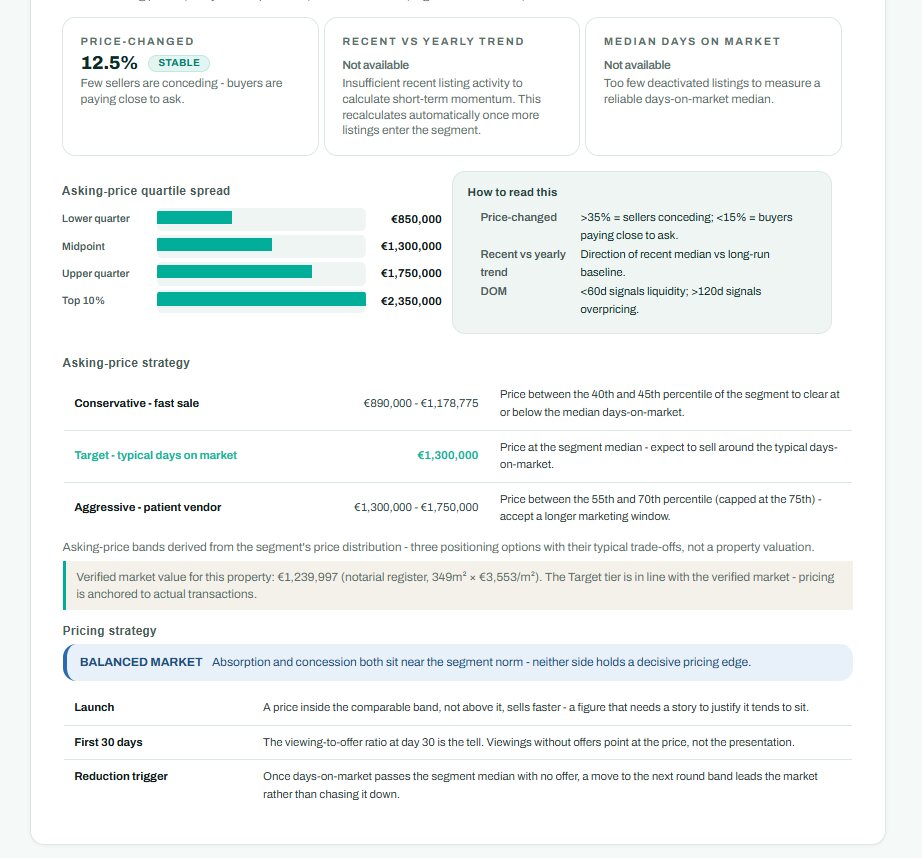
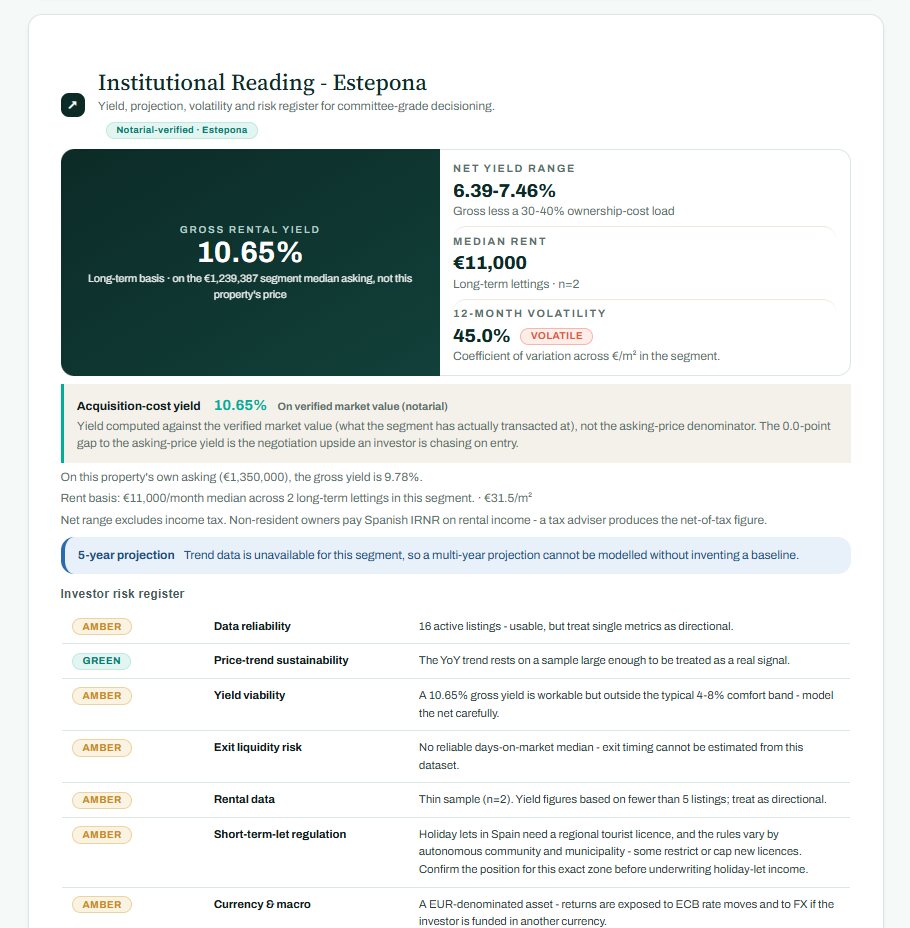
Where the data is too thin, the report says "Not available" and explains why, instead of inventing a number. That is the point: everything it does report, you can defend.
It tells you what to say
Your copy opens with an agent brief, written for you alone. It names the strongest line in this specific report, scripts the answers to the objections you will actually hear, and flags which figures need careful handling before you put them in front of anyone.
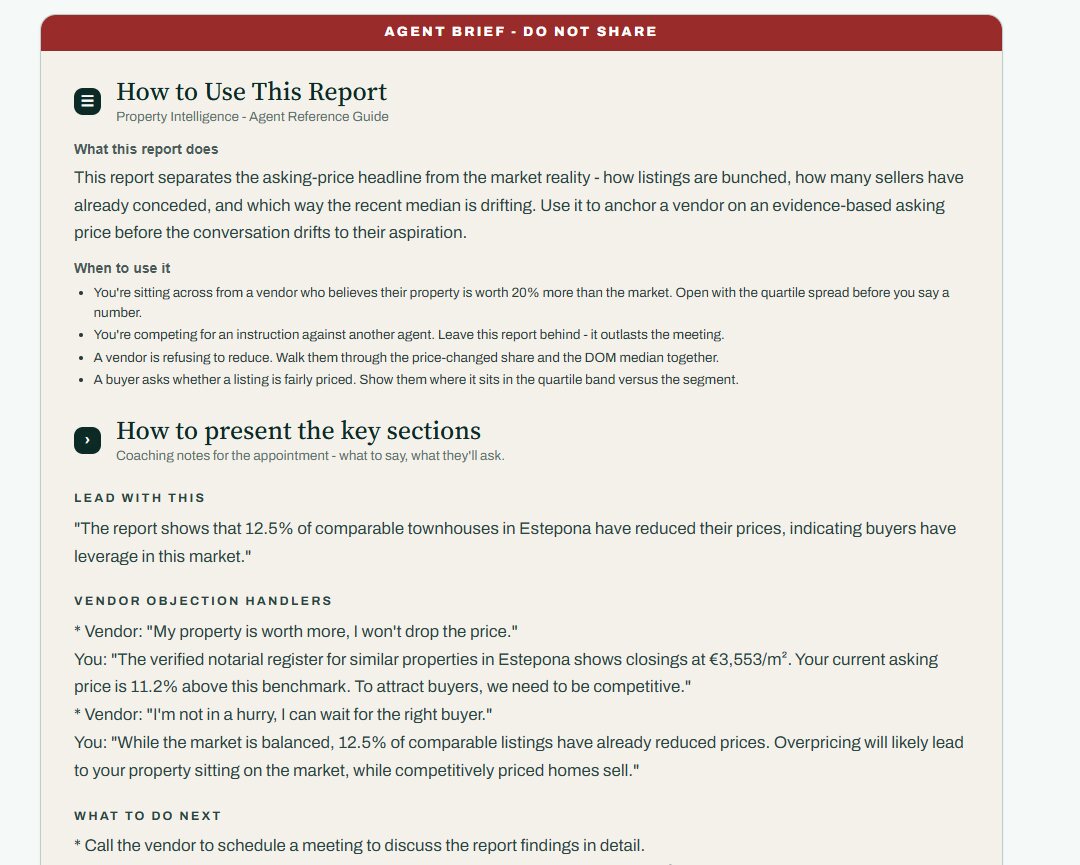
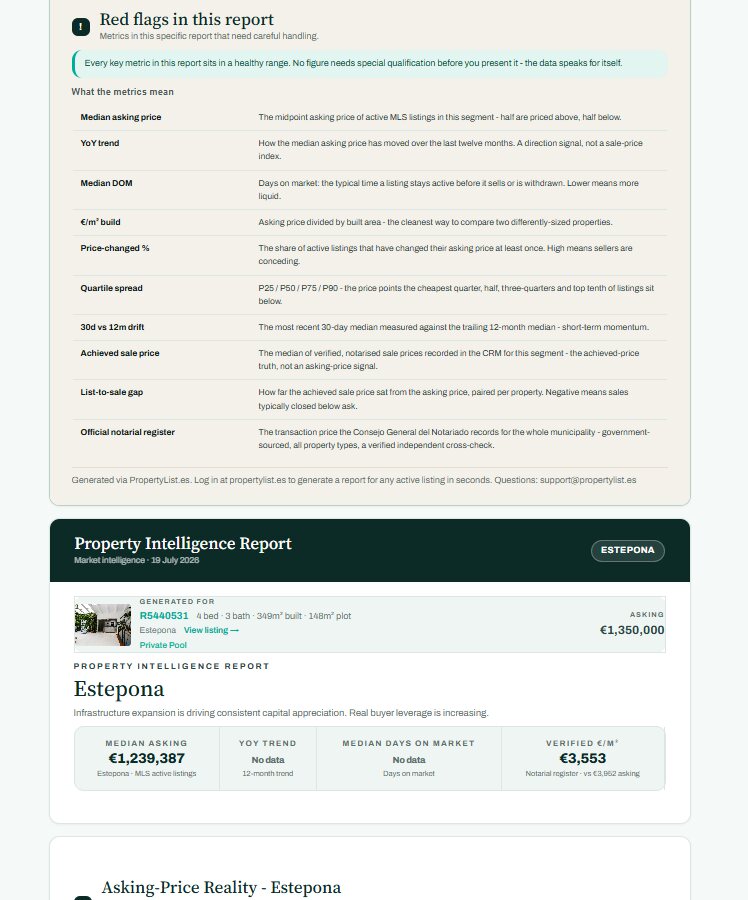
Download it as a PDF and take it to the appointment. As the brief puts it: leave it behind after a pitch, because the report outlasts the meeting.
Your client gets a different report - and you know when they read it
The agent PDF stays yours. For the client you create a share link and decide exactly what it contains: the price estimate and market conditions, comparables, location, investment outlook, analyst narrative. Add a personal note, have us email it, or paste the link into WhatsApp.
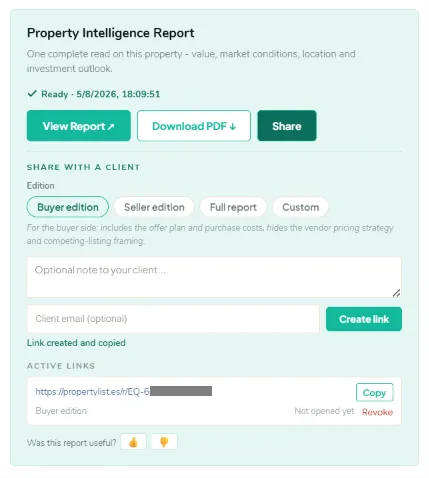
Three ready-made editions, or build your own. Buyer edition includes the offer plan and purchase costs, and hides your vendor pricing strategy and competing-listing framing. Seller edition does the opposite. Full report is everything except the agent brief. Custom lets you tick the sections yourself - 14 of them, from asking-price strategy to the analyst narrative.
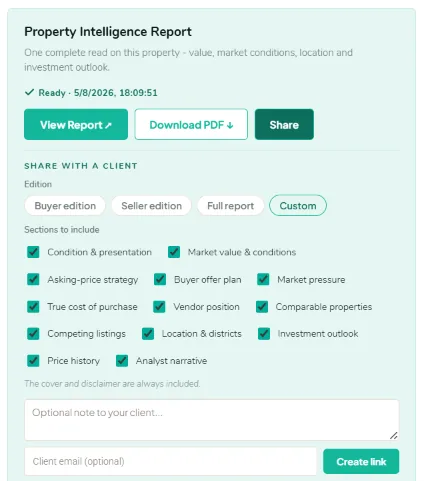
- You control the story. Share the verdict and market conditions alone, or the whole analysis - the agent brief is never included.
- You see the open. Active links show whether your client has opened it yet, so you know whether to chase.
- You can pull it back. Revoke any link and it stops working immediately.
- No friction for them. No login, no account, no credits - it opens on a phone with the verdict first and its own PDF download.
Where it earns its keep
- Winning the instruction. Two agents flatter the vendor; you bring the notarial register and a printed report they keep on the kitchen table.
- The overpriced vendor. Open with the quartile spread and the share of sellers already conceding, before anyone says a number.
- The reduction conversation. Days on market against the segment median, with the trigger agreed in advance.
- The buyer asking if it is fair. Show where the asking price sits in the band versus verified closings.
The agent report and the public reports are different things
This page is the agent side: one property, generated inside the MLS, priced in credits, with the coaching brief and the client share links. There is also a public side at intelligence.propertylist.es, open to anyone and priced in euros - free city snapshots with no signup, one-off forensic PDFs from €5 to €29, and live dashboard subscriptions at €29 or €99 a month.
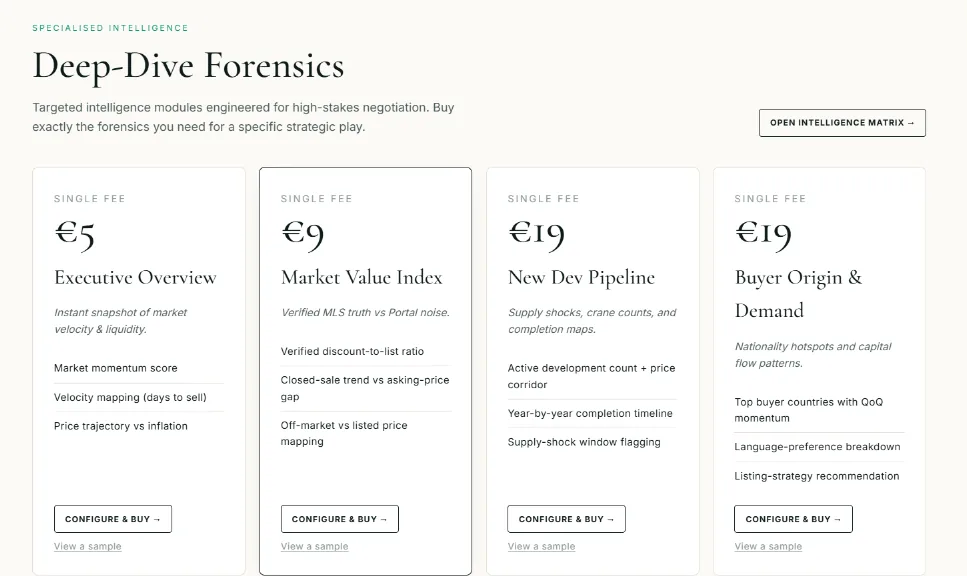
Both run on the same MLS transaction data. The difference is who they are for: the agent report answers "what is this property worth and what do I say", the public reports answer "what is this market doing".
Common questions
What is a Property Intelligence Report?
It is a full comparative market analysis (CMA) for one specific property: what the market says it is worth, how its segment is behaving, comparable listings, location context and investment outlook. It is built on live MLS data plus notary-verified transaction prices from the official Spanish register, so the numbers are defensible in front of a vendor.
How much does it cost?
5 credits per report at the current limited-time price, and your first 3 are free. Reports are cached for 30 days, and teammates in your agency can view a report you generated for free - so a busy office is not paying twice for the same property. This is the agent report inside the MLS; the public Market Intelligence products at intelligence.propertylist.es are separate and priced in euros.
What is the agent brief?
A section at the top of your copy marked "AGENT BRIEF - DO NOT SHARE". It tells you what this specific report proves, what to lead with, how to answer the objections you will actually hear ("my property is worth more", "I am not in a hurry"), and which figures in this report need careful handling. It is coaching for the appointment, written from this property’s own numbers.
Can I send the report to my client?
Yes, but not the agent PDF - that contains your coaching notes. Instead you create a share link and choose which sections the client sees. The cover and disclaimer are always included, the agent brief never is. You can add a personal note, have us email the link, or paste it into WhatsApp yourself.
Can I see if the client opened it?
Yes. Every link you create is listed with the sections it exposes and whether it has been opened yet, so you know whether to follow up. You can revoke any link instantly.
What if there is not enough data for a property?
The report says so. Where a sample is too thin to support a claim it prints "Not available" and explains why, rather than inventing a figure. That is deliberate: it is what makes the numbers it does report safe to present.
Can I produce the report in my client’s language?
Yes. Set the report language before you generate. It defaults to your own language and can be switched so the whole report comes out in the language your client reads.
Full walkthrough in the Property Intelligence Report guide, or see Area Market Reports for whole-area analysis.
Your next listing appointment is on Thursday.
Walk in with the register, the objection handlers and a report they will keep.