Feature a listing
One featuring puts your listing at the top of the MLS, the public portal and every agent MicroSite. 10, 20 or 30 credits for 3, 7 or 15 days, up to 3 at a time. Video, price, how portal leads work, and how to manage a featured listing.
Feature a listing
Listing on PropertyList is free and unlimited. When you need to accelerate a sale, you can feature a listing: for a few credits it moves to the top of the search results, in front of agents and buyers, for the number of days you choose. One featuring covers every placement in the network.
Where a featured listing appears
- The top of MLS search results, in front of more than 1,300 agents across the network who are looking for stock to show their buyers.
- The top of search results on the public portal (propertylist.es), where buyers and renters search directly.
- The top of every free agent MicroSite in the network.
You do not choose between these. One featuring, one price, all three.
Watch it: 38 seconds
How to feature a listing
- Open My Listings and open the property.
- Click Feature at the top of the listing.
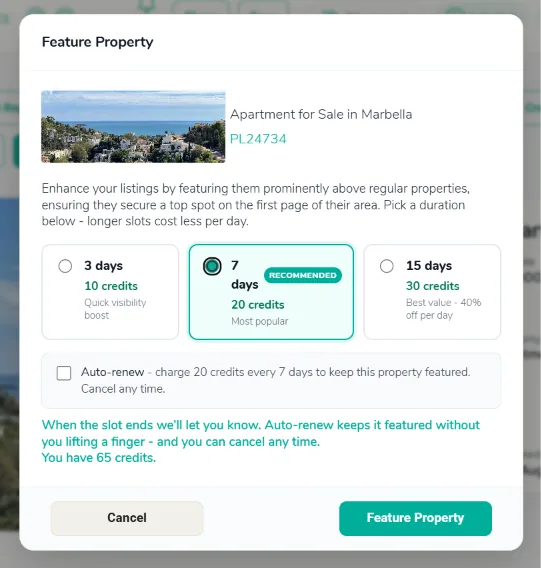
- Choose how long it stays featured: 3 days for 10 credits, 7 days for 20 credits (the most popular), or 15 days for 30 credits. Longer slots cost less per day.
- Tick Auto-renew if you want it to stay at the top without you doing anything; you can cancel any time.
- Confirm. The credits come off your balance and the listing is featured immediately.
What portal leads cost
Enquiries from the public portal currently reach you at no charge, and you do not spend credits to open one. We expect to move portal leads to a pay-per-lead model in the future, and we will tell you before that changes. Leads from other agents and enquiries from your MicroSite stay free permanently. Featuring a listing is separate and uses credits.
When a buyer requests a viewing or sends a message from the portal, that lead is captured straight into your CRM pipeline, credited to you as the listing agent.
Managing a featured listing
Can I edit it while it is featured? Yes. Text, photos, price and availability can all be changed; updates appear on the portal quickly. For a major status change (sold, withdrawn, change of strategy) update the status immediately so buyers do not enquire about something that has gone.
How do I pause or remove it? Use the listing controls in your dashboard to unfeature it; it leaves the featured positions promptly. If you plan to feature it again later, check your credit balance first.
What should a public listing carry? The energy performance certificate (certificado de eficiencia energética) and a clear identifying reference such as the referencia catastral. If it is offered as a holiday rental, attach the tourist licence where the municipality requires one. Keep the price basis clear (whether community fees or IBI are included) so enquiries are high-quality, and keep written evidence of the owner's mandate and GDPR consent for the buyer data you store.
Next steps
- Featured Agency on the portal homepage
- Portal leads - what happens when a buyer enquires
- Sharing your MicroSite - your free branded site
- MicroSite leads - enquiries from it are free, forever