Changing Property Status: Managing Market Availability
Keep real-time data accurate in the network. Whether an exclusive mandate has been successfully rented or a sale has been finalised, you must update its status immediately to reflect its true market availability.
This process lets you mark a listing unavailable, pending, or sold so others see its current state. It is a requirement of the PropertyList network to maintain an accurate digital portfolio.
Step-by-Step: How to Update a Property's Status
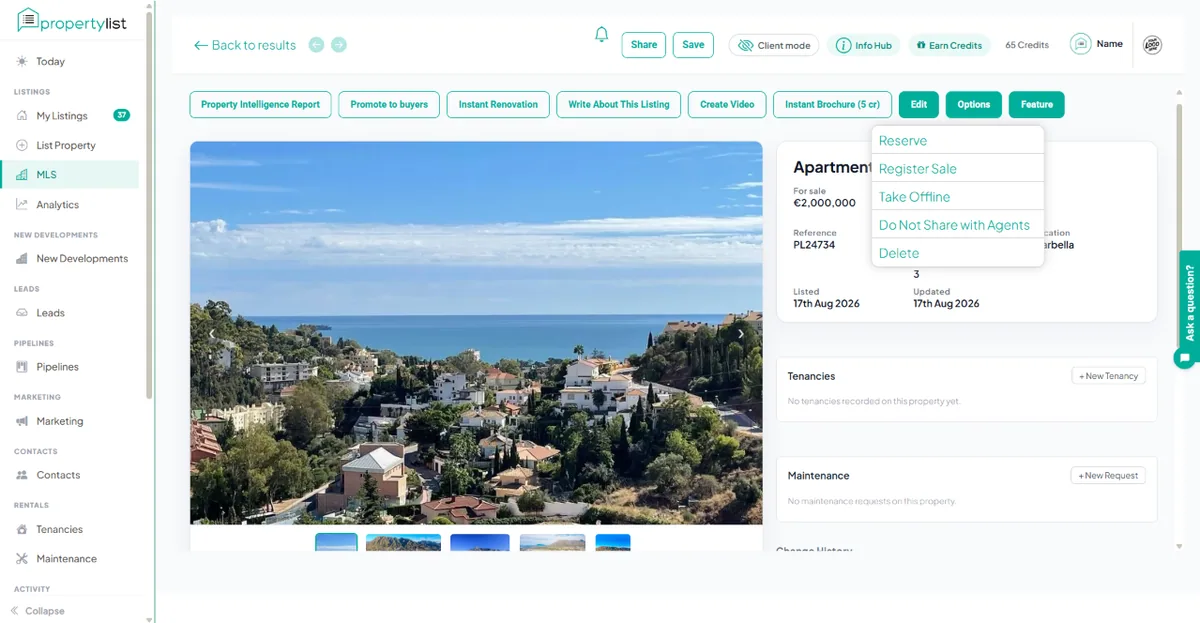
To adjust the availability of a mandate, follow these steps:
- Step 1: Access Your Active Portfolio Navigate to your main dashboard and click on the “MY LISTINGS” tab to view your complete digital inventory.
- Step 2: Locate the Mandate Scroll or search to find the specific property you need to update.
- Step 3: Open the Strategic Options Click the “OPTIONS” tab associated with that specific listing to open the management dropdown menu.
- Step 4: Deploy the New Status Select the appropriate new status from the dropdown menu to immediately update the system:
RESERVE: Use this status when a reservation deposit has been officially received and all parties have signed the reservation agreement. The property is unavailable for other offers or viewings.
REGISTER SALE: Use this status when the sale of this property has been officially finalised and signed at the notary’s office.
TAKE OFFLINE: Use this option if the property is temporarily unavailable. This action hides the listing from the MLS and from public view on the portal. The data is saved securely in your CRM, and you can bring it back online at a later date.
DO NOT SHARE WITH AGENTS: Keeps the listing live on the portal and in your CRM, but hides it from other agencies on the MLS and from microsites and feeds. The first 5 private listings are free, then 5 credits each. See Private listings.
DELETE: This action will permanently remove the property and its associated data from PropertyList. You will not be able to recover it once deleted. Use this option with extreme caution.
Promote a listing
Use the "OPTIONS" tab and select “FEATURE YOUR PROPERTY” to instantly increase its visibility across the MLS and the public Property Portal.
Next steps
- Editing existing listings
- Track enquiries - see which listings actually perform.
- Area market reports - check the local average before repricing.
Which property status option should I choose (Spain / Costa del Sol)?
Pick the status that matches the legal and commercial step the file has reached. Use RESERVE when a buyer or tenant has put down a binding deposit (for sales the common term is "arras") or has otherwise committed in writing; keep RESERVE while awaiting completion at the notary or contract signature. Switch to REGISTER SALE only after the sale has been completed in public deed (escritura) and ownership has legally transferred. For rentals, change the listing once a tenancy contract is signed and the deposit/first month has been taken.
Use TAKE OFFLINE when the property is temporarily being removed for non-transaction reasons - for example renovation, owner wants no viewings, or you need to correct listing data. TAKE OFFLINE is not a substitute for recording a buyer commitment - if you have an agreed potential buyer you should record that commitment with RESERVE or the equivalent status so other agents and clients are informed.
Practical checklist - before changing status ask: 1) Is there a signed commitment or deposit? If yes, mark as RESERVE. 2) Has the escritura been signed and keys handed over? If yes, mark as REGISTER SALE. 3) Is the property off-market for logistics or admin reasons? If yes, TAKE OFFLINE and add a return date in the notes. Update the system as soon as the situation changes so co-brokers and buyers are not misled.
Can I revert a status if a deal falls through?
Yes - if a reservation or private contract collapses you can return the listing to active status. Record the reason and date in the listing notes so co-brokers see the history.
When should I use DELETE?
Delete should be reserved for duplicate records or entries added in error. If the property may return to market, use TAKE OFFLINE instead so data and enquiry history are preserved.