Checking Availability and Registering Your Client
Contact the listing agent and schedule showings through the PropertyList infrastructure.
Check property availability, request viewings, and register your buyers through the platform. By managing your showing requests through the Smart MLS, you maintain a clear, professional paper trail for every transaction.
Step-by-Step Scheduling Workflow
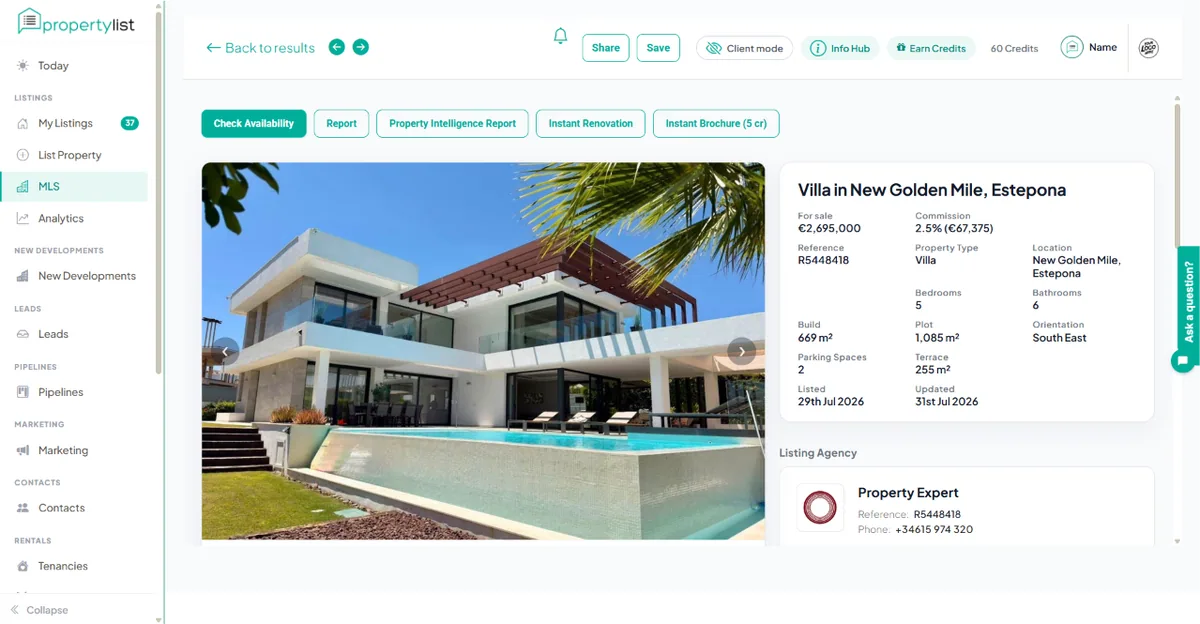
- Access the Shared MLS
Log in to your PropertyList account.
On the left-hand side menu, click the “MLS” (Multiple Listing Service) tab to access the shared MLS. - Select the Property
Browse or filter through the listings and select the specific property you wish to show to your client. - Check Availability & Register
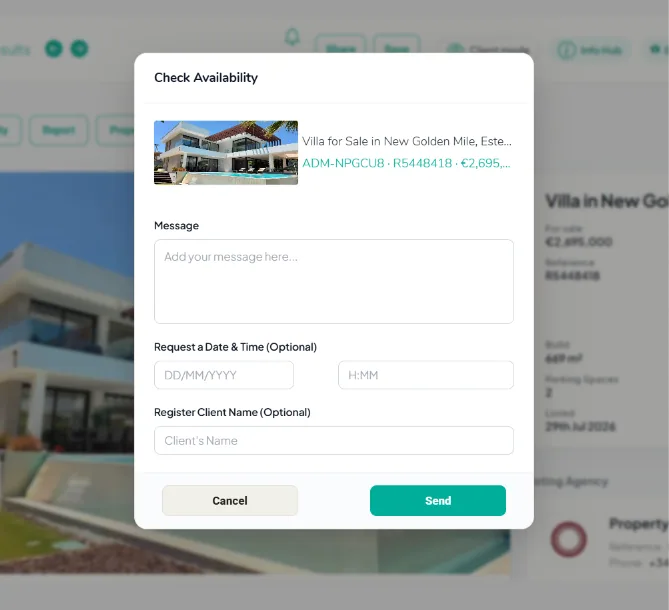
Click the “Check Availability” button located at the top left of the property details page.
Message: Send a direct message to the listing agent and optionally request a specific date and time for a showing with your client.
Register Client’s Name (Optional): You can register your client’s name with the holding agency directly from this appointment request. This ensures that the listing agency can cross-reference if the client is already registered within their CRM, protecting your lead and ensuring they are aware of who will be attending the showing. - Send the Request
Once all the details are filled in, click the “Send” button to officially submit your appointment request to the listing agent.
Automated Confirmation & Tracking
To protect your business and keep your workflow organised, you will automatically receive a copy of the appointment request in your email. Additionally, a permanent record will be stored within your PropertyList account under the "Sent Email" tab.
These steps schedule showings and notify the necessary parties.
🔒 Privacy Disclaimer
Please note that by registering your client’s name with another agency through the PropertyList network, you agree to our terms & conditions and privacy policy.
All registered members operating on the platform have agreed that this sensitive information will be used solely for the purpose of scheduling and managing property showings. We are strictly committed to protecting your client’s privacy and ensuring that all shared data is handled securely and in full compliance with Data Protection Regulations.
Next steps
- Managing your leads - turn a match into an enquiry.
- Contacts & CRM - save the buyer and their requirements.