Esta página ainda não está disponível em português. Mostramos a versão em inglês.
Instant Listing
Add photos and a voice note, and the AI fills in the listing.
Describe the property out loud, the way you would to a buyer. The AI fills in the fields and writes the description.
Instant Listing is free. Featuring the listing afterwards is separate, paid in credits.
Create your free account See how it works
1,080+ registered agencies are on PropertyList.
Start with AI
Your voice note
Three-bed villa in Nueva Andalucía, south-facing, private pool, sea views, 180 square metres built.
AI draftNot published
- Property type
- Villa
- Bedrooms
- 3
- Built
- 180 m²
- Orientation
- South
- Location
- Nueva Andalucía
- Features
- Private pool, sea views
Description
A south-facing three-bedroom villa in Nueva Andalucía, with a private pool and sea views and 180 m² built...
The AI only fills what it can see or hear. Nothing publishes without you.
How it works
It starts on the List A Property page in the CRM, in the Start with AI panel, which has three buttons: Add photos, Record voice note and Create AI draft.
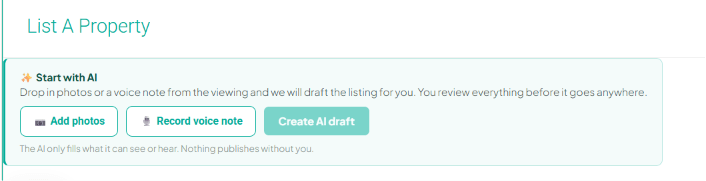
Add photos
From your phone at the viewing, or from your computer.
Record voice note
Describe the property the way you would to a buyer: the size, the layout and what will sell it. The more you say, the more fields it can fill.
Create AI draft
The AI reads the photos and your words, fills in the listing and writes the description.
Review and publish
Check every field, because the AI only fills what it can see or hear. Change what needs changing, then publish.
What the AI fills in
Only what it can see in the photos or hear in your voice note.
Property type and condition
Villa, apartment and so on, and the state it is in.
Bedrooms and bathrooms
From what you say and what the photos show.
Built, plot and terrace m²
Each area in its own field.
Features and amenities
Pool, sea views, air conditioning, parking, garden and the rest.
Orientation and location
Which way it faces, and where it is.
The description
Written for you automatically in every language. Change any version yourself, or publish them all as they are.
Nothing goes live until you publish it.
"The AI only fills what it can see or hear. Nothing publishes without you."
After you publish
Feature it
One purchase puts the listing at the top of the MLS, where 1,510+ registered agents search, and at the top of the portal and of the free agency microsites in its area. Pricing
10 credits for 3 days, 20 for 7, 30 for 15.
Enquiries come to you
Enquiries from the portal reach you by email, in your CRM and on WhatsApp via CoAgent. About CoAgent
Advertise on Google & socialComing soon
Ads on Google and social media.
At the viewing, on your phone
Take the photos and record the voice note while you are still in the property, in your phone's browser.
Common questions
How does it work?
On the List A Property page, add the photos, record a voice note describing the property and press Create AI draft. The AI fills in the listing and writes the description. You review it and publish.
Do I need both photos and a voice note?
You can start with either. The panel takes photos, a voice note or both, and the more you give it, the more fields it can fill.
What should I say in the voice note?
Talk as you would to a buyer: the type of property, the bedrooms and bathrooms, the sizes, which way it faces, where it is and the features that sell it.
Which fields does it fill?
Property type and condition, bedrooms, bathrooms, built, plot and terrace m², features and amenities, orientation, location, and the description.
What if it gets something wrong?
The AI only fills what it can see or hear, so check every field and correct anything it got wrong.
Does it cost anything?
Instant Listing itself is free with your PropertyList account. Featuring a published listing is separate and paid in credits: 10 for 3 days, 20 for 7, 30 for 15.
Does it write the description?
Yes. It writes the description automatically in every language, from the photos and your voice note. You can change any version yourself, or publish them all as they are.
Can I do it on my phone?
Yes, in your phone's browser: take the photos and record the voice note at the viewing.
Not ready to create an account?
We will email you the summary: what is included free, what costs credits, and what it replaces. Read it in your own time, or forward it to your business partner.
One email. Unsubscribe any time.